Looking for Free Labels for Your Home Canning Jars (Jams, Jellies, Sauces, Salsa, etc.), That You can Customize! in 2026? Scroll down this page and follow the links. And if you bring home some fruit or vegetables and want to can, freeze, make jam, salsa or pickles, see this page for simple, reliable, illustrated canning, freezing or preserving directions. There are plenty of other related resources, click on the resources dropdown above. If you are having a hard time finding canning lids, I've used these, and they're a great price & ship in 2 days.
If you have questions or feedback, please let me know! There are affiliate links on this page. Read our disclosure policy to learn more.
Free Labels for Your Jam and Jelly Jars, That You can Customize!
After spending the time and effort to make great homemade jars of jams and jellies to eat in the winter or give away as gifts... don't make a simple scribbled label! With a color printer and these templates, you can quickly and easily make your own labels! I've done all the hard work of formatting and adding the graphics. You just need to add your name and print!Here's what you need to know!
- They are made for Microsoft Word, version 97 or later.
- Just open them in Word and use search and replace (Ctrl-H) to find "Your Name" (WITHOUT the quotes) and replace with your own name (duh!)
- Edit anything else you want! I update them each calendar year for the appropriate "use by" dates
- Save them to your own computer's hard drive for future use.
- Print on a color printer or a black and white printer, as you wish, using the corresponding label paper. Each label has the Avery code next to it and in the file's name. I generally find the best prices Avery brand labels at Costco, Sam's Club or BJ's. You can use other brands of similar sizes. I've added links to the sellers where you can get any of these labels, and of course, if you buy them through those links, I get a small part of the sale, which helps me keep this website going!
- Copyright notice: The labels are free for your own personal use; and even for jars that you sell or give away. Just don't sell the label files or post them on the internet! Instead, just send the link to this page to anyone you want or post the link!) You can use the "email this page link" (here or at the top of the page, or copy and paste this url into your email: The link to send is: https://www.pickyourown.org/labelsforyourjars.htm
Ready to make your own labels? Here's how:
- Choose the shape of the label.
- Decide whether you want to print a standard label (a PDF) or customize your own (in a Word 97-2003 format)
- Then you will choose the label fruit or vegetable and download the PDF or Word file
- If you choose the standard PDF, you will skip to step 5.
Once you have downloaded the Word file, you open it in Word (or whatever word processor you use) and edit it to change the labels to substitute your name and any other information you (so long as you don't exceed what will fit in each label). - Then load your printer with the label stock and
- print on your print (color, if you like) and attached the labels to your jars!
So, if you're ready, click on the shape you want below below, and follow the directions on the page that loads:
- oval or
- square,
- rectangular,
- round)
How to use the labels: Tips and tricks!
There are a few tricks and tips to get the labels to stay stuck to jars which will end up in a cold refrigerator and often exposed to moisture.
- First, always start with a clean, dry surface on the jar.
- Next, swipe the area that the label will cover with a glue stick. (I use Elmer's extra strength glue sticks from Costco, but any glue sticks will work)
- Press the label onto the glued area.
- Keep pressing for about 30 seconds.
Other tips: labels printed on Laser printers are more waterproof than those printed on most ink jet printers. If your smudge, cover them with a piece of clear adhesive tape (clear packaging tape works well) will seal the labels under a waterproof cover.
Label Templates
I'm adding more labels all the time, so stop back or email me if there is a size or type you need.
Jam and Jelly Labels
small rectangular labels (Avery 5160 for laser printers or 8160 for ink jet printers)
medium rectangular labels (Avery 5162 for laser printers or 8162 for ink jet printers)
- Strawberry jam or jelly labels
- Blueberry jam or jelly labels
- Triple Berry Jam or Jelly (Strawberries, Blackberries, Raspberries jam or jelly)
- Raspberry jam or jelly labels
- Blackberry jam or jelly labels
- Peach jam or jelly labels
Round labels - for the top of the jars - 2" round - see label sources at the bottom of this page
See here for related tools, equipment, supplies on Amazon
See here for related tools, equipment, supplies on Amazon


Looking for canning equipment and supplies?
Water bath canner with a jar rack
Pressure canners for gas, electric and induction stoves: Presto 23Qt or T-fal 22Qt
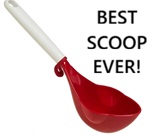 Canning scoop (this one is PERFECT)
 Ball Blue book (most recent version)
Jars: 8oz canning jars for jams

Want to start your own Podcast, Blog, Vlog, etc? This
GoPro kit has EVERYTHING you need:
all accessories
Find Other types of farms:
Farm markets and roadside stands
Road trips and camping resources
Local Honey, apiaries, beekeepers
Consumer fraud and scams information
Home canning supplies at the best prices on the internet!
Maple Syrup Farms, sugarworks, maple syrup festivals
Environmental information and resources
Farms For Your Event for birthday parties, weddings, receptions, business meetings, retreats, etc.
Festivals - local fruit and vegetable festivals
Get the
most recent version of
the Ball Blue Book
Canning and preserving, making jams, salsa, sauces, pickles, etc is SO easy with our step by step directions! Just about all you need is a canner and canning jars!
