Looking for CSS and other formatting tips and tricks in 2026? Scroll down this page and follow the links. And if you bring home some fruit or vegetables and want to can, freeze, make jam, salsa or pickles, see this page for simple, reliable, illustrated canning, freezing or preserving directions. There are plenty of other related resources, click on the resources dropdown above. If you are having a hard time finding canning lids, I've used these, and they're a great price & ship in 2 days.
If you have questions or feedback, please let me know! There are affiliate links on this page. Read our disclosure policy to learn more.
CSS and other formatting tips and tricks
CSS and other formatting tips and tricks
Newspaper columns
See example on the PYORD2.php
- Put this in the HEAD section:
/*The style below is used as the class in a div to create a 3-column like newspaper layout*/
<style type="text/css">
.newspaper {
-webkit-column-count: 3; /* Chrome, Safari, Opera */
-moz-column-count: 3; /* Firefox */
column-count: 2;
}
</style> - Then wrap the content with:
<div class="newspaper">
</div>
Newspaper columns using bullet points
<div style="width:100%;">
<ul>
<li style="margin: 0px; padding: 0px; box-sizing: border-box; text-align: left; font-size: 14px;
width: 130px; float: left;">
<a href="#Bernalillo">Bernalillo</a></li>
<li style="margin: 0px; padding: 0px; box-sizing: border-box;
text-align: left; font-size: 14px; width: 130px; float: left;">
<a href="#Catron">
Catron</a></li>
<li style="margin: 0px; padding: 0px;
box-sizing: border-box; text-align: left; font-size: 14px; width: 130px; float: left;">
<a href="#Chaves">
Chaves</a></li>
<li
style="margin: 0px; padding: 0px; box-sizing: border-box; text-align: left; font-size: 14px; width: 130px; float: left;">
<a href="#Cibola">
Cibola</a></li>
<li style="margin: 0px; padding: 0px; box-sizing: border-box; text-align: left; font-size: 14px; width: 130px; float: left;">
<a href="#Colfax">
Colfax</a></li>
</UL>
</div>
Example:


Looking for canning equipment and supplies?
Water bath canner with a jar rack
Pressure canners for gas, electric and induction stoves: Presto 23Qt or T-fal 22Qt
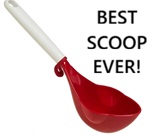 Canning scoop (this one is PERFECT)
 Ball Blue book (most recent version)
Jars: 8oz canning jars for jams

Want to start your own Podcast, Blog, Vlog, etc? This
GoPro kit has EVERYTHING you need:
all accessories
Find Other types of farms:
Farm markets and roadside stands
Road trips and camping resources
Local Honey, apiaries, beekeepers
Consumer fraud and scams information
Home canning supplies at the best prices on the internet!
Maple Syrup Farms, sugarworks, maple syrup festivals
Environmental information and resources
Farms For Your Event for birthday parties, weddings, receptions, business meetings, retreats, etc.
Festivals - local fruit and vegetable festivals
Get the
most recent version of
the Ball Blue Book
Canning and preserving, making jams, salsa, sauces, pickles, etc is SO easy with our step by step directions! Just about all you need is a canner and canning jars!
